How to Lock Down Your Instagram Privacy Settings

Table of Contents
Instagram is a great place to see videos and pictures curated by millions of people around the world. You can see everything from vacation pictures to art, family events, and much more. However, you might not want the whole world to see everything contained in your Instagram profile.
Locking down your Instagram privacy settings is a simple task, and it can give you peace of mind if you want to enjoy social media without worrying about who is watching.
Why Lock Down Your Instagram Privacy Settings?
Locking down your Instagram profile keeps people out of all your images and videos. This is helpful because your children, family, and co-workers might be in those pictures and videos. Additionally, future employers or communities might judge you based on what is in your Instagram profile, unfortunately.
There’s countless stories about people being fired or disciplined for their posts on Instagram (like here, here and here).
To avoid an uncomfortable situation such as this—and many more—you can easily lock down your Instagram profile.
Locking Down Kids Accounts
Instagram is so popular that your child will want to open an account fairly young. When you allow them to start an IG account, you might want to monitor it for them. You can use these instructions to lock it down. When the account is all their own, you need to know how to lock it down so you can explain what to do and why.
How to Lock Down Your Instagram Privacy Settings
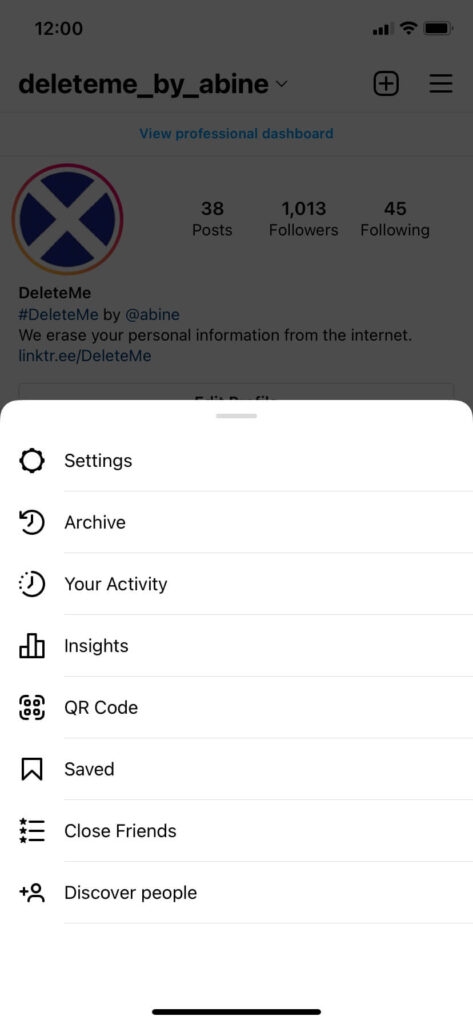
When you want to lock down your Instagram account, start by going to the settings menu.
Go to the three-bar menu at the top right of your screen. When you enter the menu, choose the Privacy tab.
Simply click on the Private Account tab until the button moves to the right.
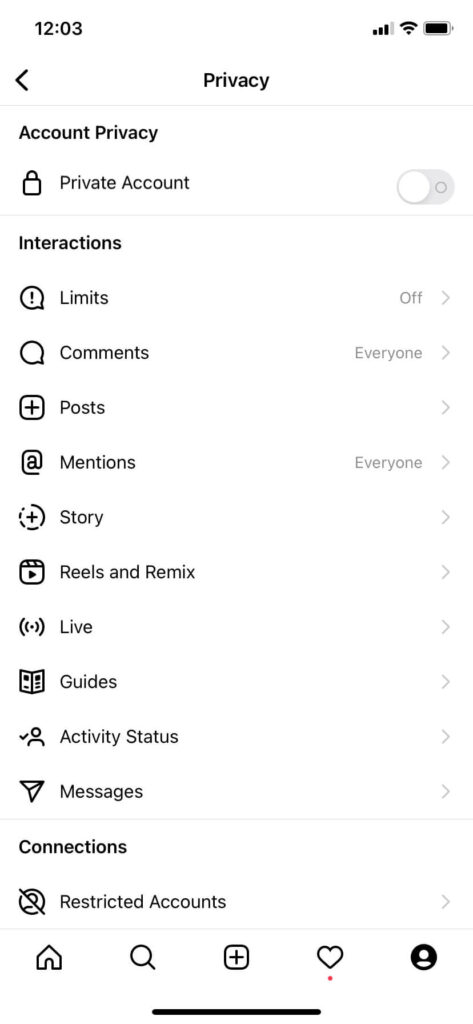
Now, go through the rest of your Instagram settings to ensure your privacy:
- Check your Activity Status which allows others to see when you were last active on IG
- Check your Story Sharing settings, which keeps others from sharing stories that you post to Instagram
- Check your Embeds settings, which allows others to embed your IG posts and profile on other websites
Benefits of Locking Down Your Instagram Profile
When you lock down your Instagram profile, you get several benefits, including:
- The public cannot see your pictures, reels, stories, or videos
- The public cannot see images you are tagged in
- The public cannot see your followers list
- The public cannot see your following list
For more information on protecting your personally identifiable information and maintaining your data privacy, visit joindeleteme.com.

news?

Don’t have the time?
DeleteMe is our premium privacy service that removes you from more than 750 data brokers like Whitepages, Spokeo, BeenVerified, plus many more.
Save 10% on DeleteMe when you use the code BLOG10.
Related Posts
Loyalty Programs Are a Data Trap. Here’s How to Opt Out.
What Should You Look for in a Privacy Policy?