Slack AI Training Opt-Out Guide


Table of Contents
You can opt out of Slack AI training (or rather, Slack machine learning training) in just one step. All I had to do was send them a short email. This took me under two minutes.
Below, I explain exactly what to say to Slack, how to email them to opt out of machine learning training, and why you should or shouldn’t do this in our opt-out guide below.
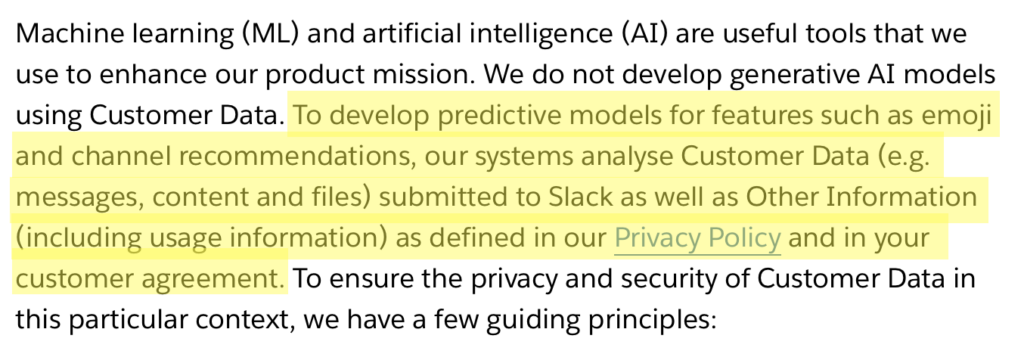
Slack (owned by Salesforce) says that it doesn’t actually use customer data to train generative AI models. However, the company does analyze messages, content, and files in Slack workplaces for the development of predictive models for features like emoji suggestions and channel recommendations.
It is possible to opt out of this, though only if you’re a workspace admin.
What Is Slack Machine Learning Training?
Slack machine learning training refers to Slack using data from messages, files, and other content in workspaces to develop and improve its machine learning models.
In 2024, when news of Slack AI broke, people were worried that Slack might be feeding their private Slack messages into AI training.
Slack responded to these concerns, saying that it only uses some machine learning models internally to be able to suggest which channels users might want to join, recommend emoji reactions, and make its search results better.
It notes that these are traditional machine learning models, not generative AI (i.e., not like ChatGPT or similar), but that, in any case, organizations can opt out if they don’t want their data used to help train even these basic recommendation models.
It also noted that their machine learning models can’t spit back out actual user messages or content, only learn patterns (e.g., “people who use channel X also tend to use channel Y”).

How to Opt Out of Slack Machine Learning Models
Opting out of Slack machine learning models is only possible if you’re a workspace owner or administrator. Individual users cannot opt out on their own (though you can ask your workspace owner to do so).
To opt out of Slack machine learning model training, you need to send Slack support an opt-out email.
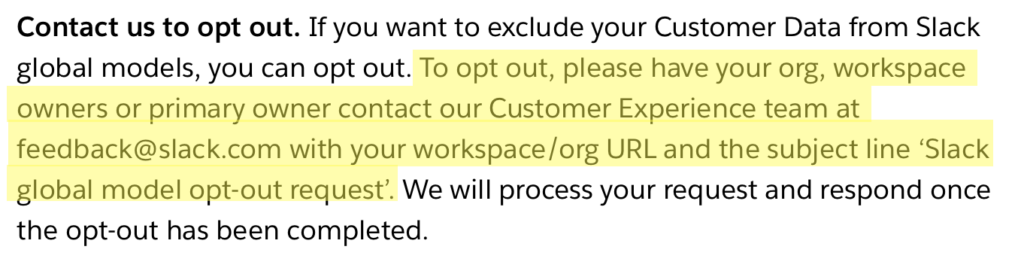
Stop Slack from using your data for machine learning models in one step.
1. Send Slack an email opt-out request
Send an email to [email protected] with the subject line “Slack Global Model Opt-Out Request.”
In the body of the email, include your workspace URL.
Slack says it will respond to you to confirm that your opt-out request has been processed.
We recommend that you keep a copy of this confirmation for your records.
What Happens After You Opt Out of Slack Machine Learning Models
After your workspace opts out, Slack states it will no longer use data from your workspace to train its internal machine learning models.
How to Contact Slack
You can contact Slack about privacy concerns through the following channels:
- Email. [email protected] (for requests to opt out ) or [email protected] (for privacy inquiries).
- Help Center. https://slack.com/help
- Support ticket. Paid workspaces can submit support tickets through the Slack admin console.
For GDPR-related requests, Slack (as part of Salesforce) has a Data Protection Officer who can be reached through the privacy contact information on their website.
Don’t Forget Data Brokers and People Search Sites
After you opt out of AI training, you should take the time to also remove yourself from people search sites.
These sites make money by collecting your personal data from public sources such as public records and social media, collating it into detailed profiles, and selling it to anyone, more or less.
As long as someone knows your name, phone number, email address, or address (i.e., they only need to know one piece of information about you), they can find more data about you, including where you live, who you’re related to, where you work, where you went to school, and links to your social profiles.
- Opting out of Slack keeps your workspace’s data from being used to train Slack’s AI models.
- Opting out of data brokers and people search sites protects your data from being sold and exposed to anyone on the web.
Read about people search sites and data brokers in our comprehensive data broker guide.
Then check out our step-by-step data broker and people search site opt-out guides to start removing yourself from sites such as Spokeo, PeopleFinders, Intelius, Instant Checkmate, TruthFinder, BeenVerified, Radaris, Fast People Search, and others.
Removing yourself once from these sites is not enough. People search sites republish people’s data when they come across more of it, so opt-outs need to be continuous for maximum privacy. Make a note to recheck these sites periodically. If you find that your data has resurfaced, opt out again.
Don’t have the time for manual removals? Data broker removal companies like DeleteMe can opt you out of people search sites on your behalf, ensuring that your personal information stays off these platforms for good.

news?

Don’t have the time?
DeleteMe is our premium privacy service that removes you from more than 750 data brokers like Whitepages, Spokeo, BeenVerified, plus many more.
Save 10% on DeleteMe when you use the code BLOG10.
Related Posts


Julius AI Data Privacy Settings Guide