How to Opt Out of Zoom AI Training


Table of Contents
I use Zoom almost daily. So when I went looking for how to opt out of Zoom AI training, I was happy to find out I didn’t need to.
Zoom says it doesn’t actually use your meeting content to train its AI models, so there is no AI training opt-out toggle to find.
That said, if you’re really privacy conscious, you’ll also be glad to know that you can control whether Zoom’s AI Companion (Zoom’s AI assistant) features are turned on and processing your content.
What Is Zoom AI Training?
There’s no such thing as Zoom AI training.
Zoom says that it “does not use any of your audio, video, chat, screen sharing, attachments, or other communications-like content (such as poll results, whiteboards, and reactions) to train Zoom’s or third-party AI models.”
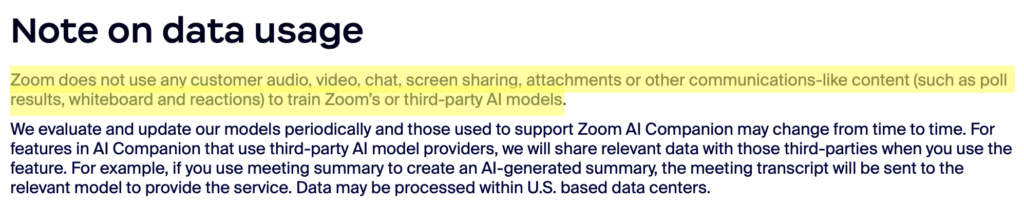
However, Zoom does note that it may process your data as part of its AI Companion features (which are only available if you pay for specific Zoom products).
To do its job, AI Companion features have to read and process your content. For example, meeting summaries and the AI Companion Q&A feature generate speech-to-text data that gets sent to an AI model to produce the summary or answer.
For this, Zoom uses both its own AI models and third-party providers (e.g., OpenAI and Anthropic), though the models used can change over time. When a feature relies on a third-party model, the provider receives relevant data to run it.
Zoom says it has no data retention agreements with those third-party providers, meaning they do not retain your content after processing (with a few exceptions for trust and safety). Zoom also says it does not allow those providers to train on your data.
The one thing Zoom does use to improve its features is the feedback you actively give. This includes thumbs up or down, preselected text, free text, and your prompt if you choose to submit it. This feedback may be reviewed by Zoom employees to check that the features are working and to improve the service.
It’s also worth knowing that AI Companion is off by default, with customers themselves choosing whether they want to turn on generative AI features or not. If you join someone else’s meeting where AI Companion is turned on, your audio will be processed under their settings, not yours.
How to Opt Out of Zoom AI Training
You cannot opt out of Zoom AI training because Zoom does not use your data to train AI models.
However, you can turn off Zoom’s AI companion. (Note: You need to be an account owner or admin to change these settings).
How to Turn Off Zoom AI Companion
You can turn off Zoom AI Companion in four steps.
1. Sign in to your Zoom account
Go to https://www.zoom.com/ and sign in to your account by clicking the “Sign In” link.
2. Click “Account Management” and “Account Settings”
From the menu on the left, click the “Account Management” link.
Then, click the “Account Settings” link.
3. Click “AI Companion”
Select the “AI Companion” tab.
4. Turn off the features you don’t want
Here, you can turn off the features you are not interested in (for example, ‘Meeting Summary with AI Companion.’
How to Contact Zoom
You can contact Zoom by submitting a support ticket at support.zoom.com/hc/en/contact and/or using live chat or the Zoom Virtual Agent from that same support page.
For more information on how Zoom handles AI data, read the Zoom AI Companion Security and Privacy Whitepaper and the Zoom Privacy Statement.
Don’t Forget Data Brokers and People Search Sites
Opting out of AI training is important for privacy, but so is opting out of data brokers and people search sites.
The two work in different ways:
- Opting out of AI training keeps your information from being used for AI model training.
- Opting out of data brokers and people search sites keeps your personal details from being exposed to marketers, politicians, spammers, and just nosy individuals.
Data brokers and people search sites are companies that look for people’s personal information across a wide variety of sources, collate this data into comprehensive profiles on each individual, and sell this data to anyone who wants it.
As long as someone knows some information about you (your name or your username, for example), they can find out more details about you, including where you live or who you’re related to.
If that sounds like a privacy risk to you (which it is), you’ll be glad to know that you can opt out. Check out our step-by-step data broker and people search site opt-out guides to start removing yourself from these sites.
Or, get a data broker removal service like DeleteMe to do so on your behalf.

news?

Don’t have the time?
DeleteMe is our premium privacy service that removes you from more than 750 data brokers like Whitepages, Spokeo, BeenVerified, plus many more.
Save 10% on DeleteMe when you use the code BLOG10.
Related Posts


Julius AI Data Privacy Settings Guide
Microsoft Copilot Privacy Settings Guide