How to Opt Out of Adobe AI Training


Table of Contents
Opting out of Adobe AI training was very easy and only took me three steps. I’ve walked through each of these in the Adobe AI training opt-out guide below.
Adobe says it does not analyze your content to train generative AI models (except when you submit content to the Adobe Stock marketplace), but it may analyze the content you create with its Creative Cloud applications using machine learning to improve its products and services.
Use our step-by-step guide below to opt out of Adobe content analysis for service and product improvement.
What Is Adobe AI Training?
Adobe AI training refers to Adobe analyzing content created with its applications to improve its services.

Adobe has also said that it does not access content stored locally on your device.

Adobe’s content analysis applies mostly to files stored in Adobe’s cloud services, including Creative Cloud storage and Adobe Express.
How to Opt Out of Adobe AI Training
You can opt out of Adobe content analysis through your Adobe account settings.
Opt out of Adobe AI training in three steps.
1. Sign in to your Adobe account
Go to https://account.adobe.com/ and sign in with your Adobe ID and password.
2. Go to data and privacy settings
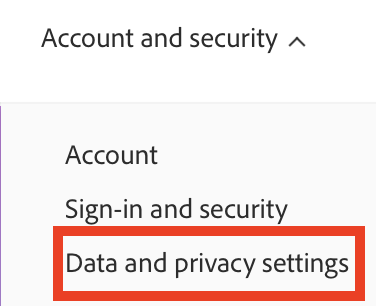
Once you are in your Adobe account, click “Account and security” in the upper menu.

Then, click “Data and privacy settings.”
3. Find the ‘Content analysis for product improvement’ section
Scroll down until you see a section related to content analysis or machine learning.
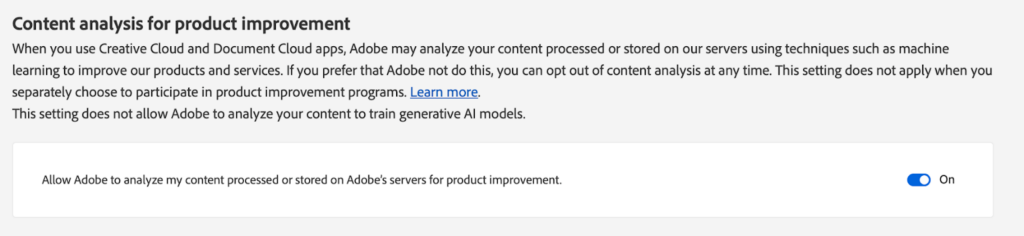
Toggle the setting to “Off.”

You will see a pop-up message that confirms your privacy settings have been saved.

What Happens After You Opt Out of Adobe AI Training
After you toggle off content analysis in your Adobe account settings, Adobe states it will no longer analyze your content for the purposes of improving its products and services.
What was the 2024 Adobe terms of service controversy?
In mid-2024, Adobe faced significant backlash after updating its terms of service in a way that many users interpreted as granting Adobe broad rights to access and use their creative work. Adobe later clarified that it does not train Firefly on Creative Cloud subscriber content and updated its terms to be more transparent.
How to Contact Adobe
You can contact Adobe about privacy concerns through the Adobe Privacy Center at https://www.adobe.com/privacy.html (scroll until you see ‘Questions? Contact us” link.
Adobe also provides chat and phone support for account-related issues, which you can access at https://helpx.adobe.com/contact.html.
Don’t Forget Data Brokers and People Search Sites
After you opt out of AI training, take the time to also remove yourself from data brokers and people search sites.
These are companies that collect your personal data from sources like public records and social media, combine it into a comprehensive profile, and then sell it to anyone who wants to know more about you.
As long as someone knows your name or phone number or address (or, in some cases, even just a username), they can find additional information about you, including your contact details, who you’re related to, your education and employment history, links to your social media profiles, and more.
- Opting out of Adobe keeps your content from being used to improve its products.
- Opting out of data brokers and people search sites protects your personal data from being sold and exposed to strangers.
Find out more about the data broker industry in our detailed data broker guide.
Then, go through our step-by-step data broker and people search site opt-out guides to start opting out of sites such as BeenVerified, Radaris, Intelius, TruthFinder, PeopleFinders, Spokeo, Fast People Search, Instant Checkmate, and others.
Opting out of people search sites once is not enough. Data brokers and people search sites are known to republish people’s data when they come across more of it. To maintain your privacy, you’ll need to revisit these sites periodically and opt out again if your data has resurfaced.
If you don’t have the time for continuous, manual opt-outs, consider a data broker removal service like DeleteMe. Our privacy experts continuously search for and remove your personal details from people search sites to ensure the strongest possible privacy protection.

news?

Don’t have the time?
DeleteMe is our premium privacy service that removes you from more than 750 data brokers like Whitepages, Spokeo, BeenVerified, plus many more.
Save 10% on DeleteMe when you use the code BLOG10.
Related Posts


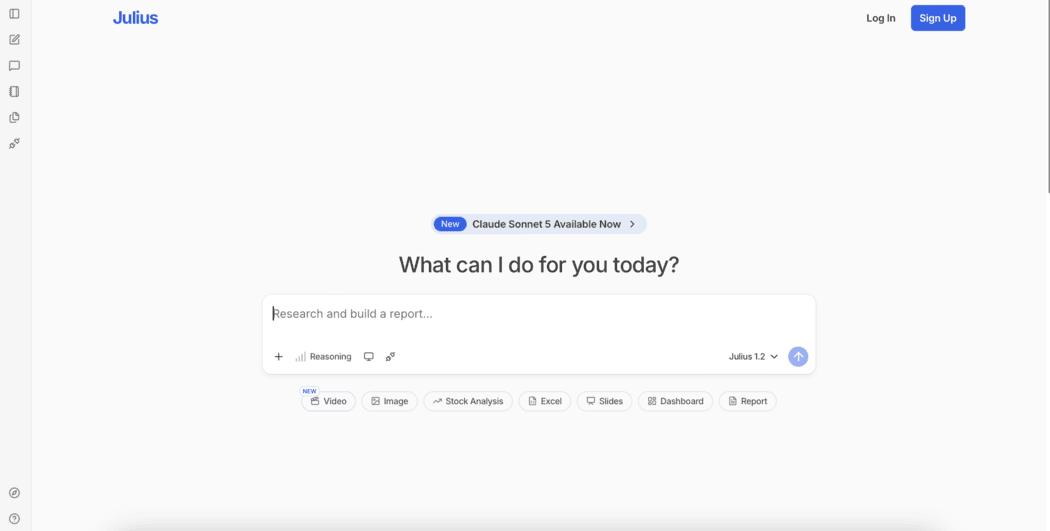
Julius AI Data Privacy Settings Guide