How to Opt Out of GitHub AI Training


Table of Contents
I’ve been using GitHub to host small projects for several years, so I wanted to make sure my code wasn’t being used to train AI. Fortunately, it was very easy to opt out of GitHub AI training. There are just three steps, which I outline in this GitHub opt out of AI training guide.
In early 2026, GitHub announced that it would begin using Copilot interaction data from Free, Pro, and Pro+ users to train its AI models. Copilot Business and Copilot Enterprise users are not impacted by this.
This includes your inputs, like prompts and surrounding code context, and outputs, like the suggestions Copilot generates. The setting is on by default, so unless you opt out, your data is automatically included in training.
The good news is that turning it off takes about a minute. Use our step-by-step guide below to opt out of GitHub AI training.
What Is GitHub AI Training?
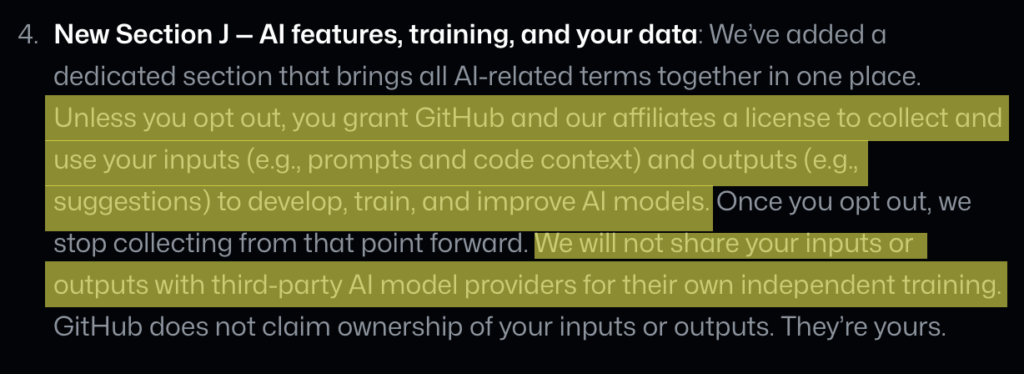
GitHub AI training refers to GitHub and its affiliates (i.e., part of GitHub’s corporate family) using your inputs into Copilot (e.g., prompts) and outputs (e.g., suggestions) to train their AI standards.
This applies to Copilot Free, Pro, and Pro+ users by default. If you don’t want your inputs or outputs used to train AI models, you need to opt out.
GitHub notes that it doesn’t share your inputs or outputs with third-party AI model providers for training their own models.
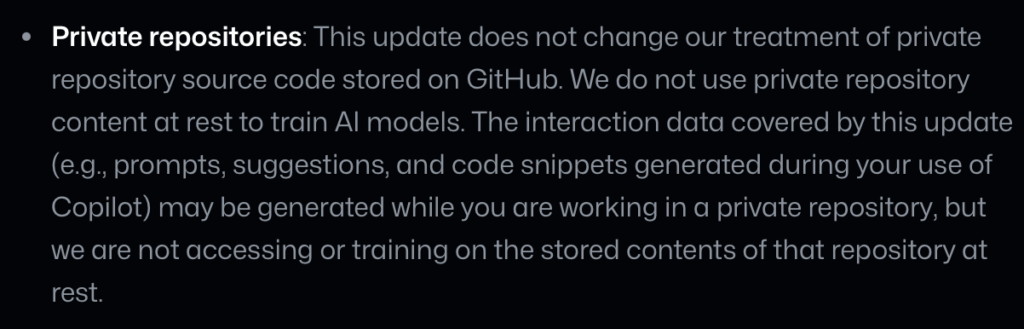
AI training does not apply to the contents in your private repository unless you yourself feed your private repository’s content into one of GitHub’s AI tools as input.
How to Opt Out of GitHub AI Training
Opt out of GitHub AI training in three easy steps.
1. Sign in to your GitHub account
Go to https://github.com/ and sign in to your account by clicking the “Sign in” button in the top right.

2. Click your profile icon
Click your GitHub profile icon in the top right.

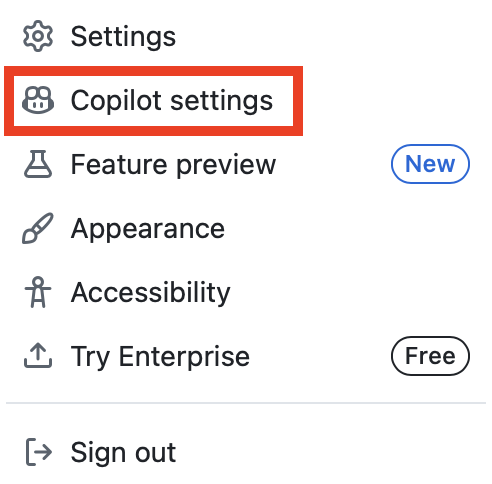
A dropdown menu will appear. Select “Copilot settings.”
3. Select “Disabled” next to GitHub AI training setting
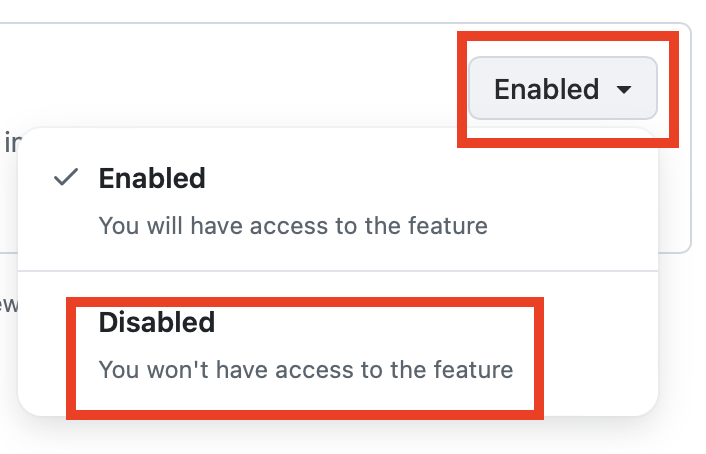
Under ‘Privacy,’ you will see a toggle beside the “Allow GitHub to use my data for AI model training” setting.

Click the dropdown and select “Disabled.”
That’s it.
You’ve turned off GitHub’s AI training feature.
What Happens After You Opt Out of GitHub AI Training
After you opt out of GitHub AI training, GitHub and its affiliates will no longer use your inputs into Copilot and outputs to train its AI models.
How to Contact GitHub
You can read more about GitHub’s AI training and join the discussion about it here: https://github.com/orgs/community/discussions/188488.
Don’t Forget Data Brokers and People Search Sites
Opting out of AI training is important, but so is opting out of data brokers and people search sites.
- Opting out of AI training protects your public information from being used to train AI models.
- Opting out of data broker sites stops your personal data from being sold and exposed to strangers.
Data brokers and people search sites are companies that collect your personal information from a wide range of sources, compile it into detailed profiles, and then sell them to anyone who wants to buy them.
Thanks to sites like Whitepages, BeenVerified, Intelius, Spokeo, and others, anyone can find your personal information (including your full name and where you live) with a simple Google search.
Learn more about data brokers in our data broker guide.
Then, see our step-by-step data broker and people search site opt-out guides to start removing yourself from these sites.
Don’t fancy spending hours opting out manually (and repeating the process in a few months – data brokers and people search sites relist your data as soon as they find more of it, so opt-outs need to happen regularly)? That’s where data broker removal services like DeleteMe come in. Our privacy experts remove you from data brokers and people search sites on your behalf (and make sure you stay off them).

news?

Don’t have the time?
DeleteMe is our premium privacy service that removes you from more than 750 data brokers like Whitepages, Spokeo, BeenVerified, plus many more.
Save 10% on DeleteMe when you use the code BLOG10.
Related Posts



Julius AI Data Privacy Settings Guide