WhatsApp AI Training Opt-Out Guide


Table of Contents
I tried to opt out of WhatsApp AI training. Unfortunately, I was disappointed. That’s because WhatsApp AI training doesn’t have an opt-out setting.
However, there are some ways to minimize your exposure to AI training when using Meta AI, which I explain below.
What Is WhatsApp AI Training?
WhatsApp AI training refers to Meta using what you share with its AI assistant to help improve its models.
Meta says that when you use Meta AI through WhatsApp, it receives your prompts, AI messages, and feedback.
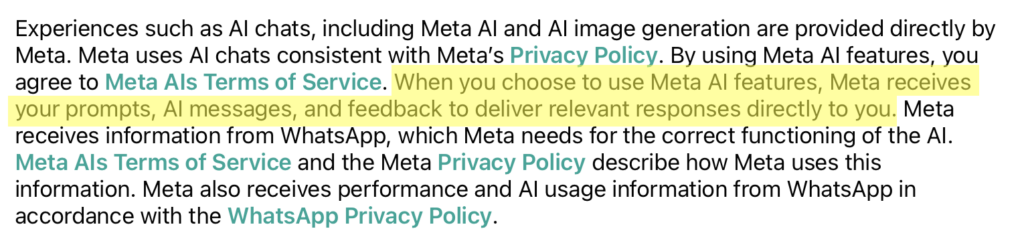
In Meta AIs Terms of Service, Meta warns not to share information with its AIs that you don’t want the AIs to use and retain.

It’s important to note that as of this writing, WhatsApp AI training applies only to your chats with the AI assistant. WhatsApp messages with other people remain private (i.e., they’re not shared with Meta for AI training) as they are end-to-end encrypted.
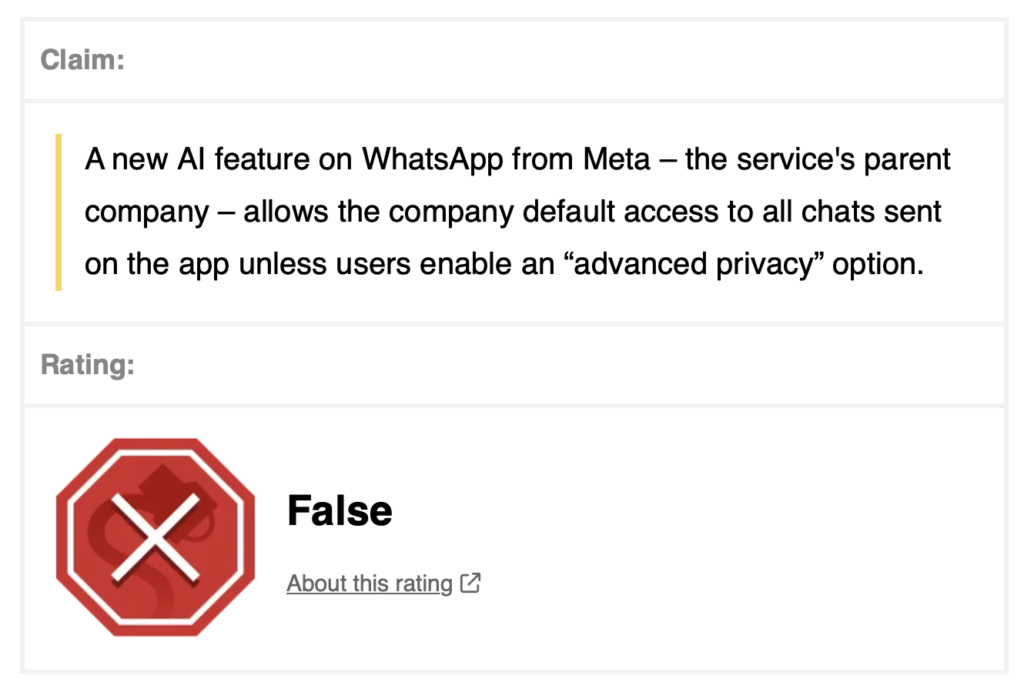
When the AI feature on WhatsApp first came out, some individuals claimed that Meta would be able to access all chats. However, this has been debunked by several publications, including Snopes.
How to Opt Out of WhatsApp AI Training
Since there is no setting in WhatsApp to opt out of Meta AI training, the best option is to limit your exposure.
You can do this in one of two ways.
Avoid Meta AI completely
Don’t click the Meta AI icon, don’t query it through the search bar, and don’t tag @Meta AI in your chats. If you never share anything with the assistant, then there’s nothing for Meta to use.
Use incognito mode if you use Meta AI
In May 2026, Meta introduced an incognito mode built on its “Private Processing” infrastructure, which runs AI inference inside secure environments. The conversation is never shared with anyone, not even Meta themselves (according to Meta).
Your messages are temporary and not saved, and your messages disappear by default.
How to Contact WhatsApp
You can contact WhatsApp by opening the WhatsApp app on your phone, then navigating to “Settings,” clicking “Help,” and selecting “Contact Us.”
Alternatively, send them a message here: https://www.whatsapp.com/contact/noclient?lang=en_US.
Don’t Forget Data Brokers and People Search Sites
If you’re interested in opting out of AI training, there’s another step you should take at the same time.
Opting out of AI training matters for your privacy, but so does opting out of data brokers and people search sites.
The two protect you in different ways:
- Opting out of AI training keeps your data from being used to train AI models.
- Opting out of data brokers and people search sites prevents your personal details from being exposed for anyone to see.
Data brokers and people search sites collect your personal information from various sources (social media, public records, etc.), compile it into detailed profiles, and sell these profiles to just about anyone.
Anyone with minimal information about you (for example, your full name) can find out exactly where you live, where you went to school, where you work, and who you’re related to, among other things.
Don’t like the sound of that? See our step-by-step data broker and people search site opt-out guides to start opting yourself out of these sites.
Or, get a data broker removal service like DeleteMe to do so on your behalf.

news?

Don’t have the time?
DeleteMe is our premium privacy service that removes you from more than 750 data brokers like Whitepages, Spokeo, BeenVerified, plus many more.
Save 10% on DeleteMe when you use the code BLOG10.
Related Posts


Julius AI Data Privacy Settings Guide